Endlesss: A Game-Changer for Collaborative Development Tools in 2023
What is Endlesss?
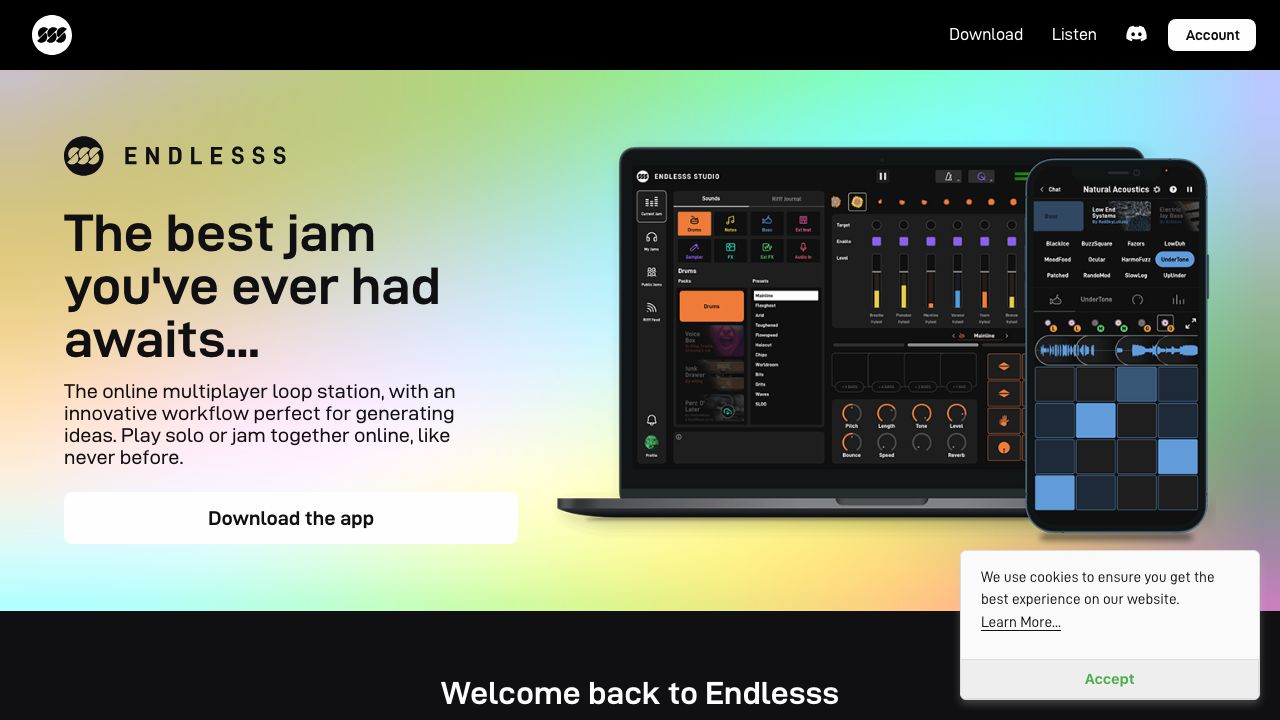
Endlesss is a collaborative music-creation platform designed for fast, bite-sized, remote jamming. It’s built around short loop stacks (called “Rifffs”) that you and your team layer up in shared “Jams,” either live or asynchronously. If you’ve ever struggled to brainstorm musical ideas over Zoom or pass DAW projects back and forth, Endlesss compresses that friction to near-zero. There’s a mobile app for quick ideas on the go and Endlesss Studio for desktop and DAW integration, making it practical for both casual ideation and professional production workflows. Learn more at https://endlesss.fm.
Key Features and Capabilities
-
Jam rooms and Rifffs: The core loop object is a “Rifff”—a stack of layers (drums, bass, synth, vocals, etc.). Everyone in a Jam can add or tweak layers, so ideas evolve quickly without overwriting each other’s work. The loop-first model avoids the usual latency chaos of live remote sessions because you’re stacking contributions, not streaming a fragile live mix.
-
Cross-platform workflow (mobile + desktop + plugin): Capture a beat on your phone in a Jam during your commute, then open the same Jam in Endlesss Studio on your Mac/Windows machine to refine it with better monitoring and controllers. Use the Endlesss Studio plug-in (AU/VST3) inside your DAW to move ideas from Endlesss into Ableton, Logic, or FL Studio. In practice, I’ll sketch 8-bar loops on mobile and pull those into Ableton via the plugin to arrange and mix.
-
Built-in instruments and effects: Endlesss comes with simple, immediate tools (drum engines, synths, mic input, and creative FX like filters, delays, and beat repeaters). The point isn’t to replace a full DAW; it’s to remove the blank-canvas friction so teams can ideate fast. I’ve watched non-producers contribute meaningful layers within minutes—huge for cross-functional teams (product, design, dev) who want to co-create sonic assets or UI sounds.
-
Collaboration primitives that scale: Public or private Jams let you decide whether you’re co-creating with a small team or testing ideas with the community. The moderation-friendly structure (additive layers, comments, and invite controls) makes it safer than flinging raw project files around. For product teams, it’s an easier on-ramp to capture voice notes, sonic sketches, UI tones, and podcast stingers without scheduling a live session.
-
Export and DAW handoff: When a Rifff is ready, you can export audio and bring stems into your DAW for linear arrangement, deeper sound design, and mixing. In my workflow, Endlesss handles the “what if?” stage; the DAW handles “let’s ship it.” The separation keeps creative velocity high and production quality uncompromised.
Getting Started
-
Create an account at https://endlesss.fm and install the mobile app and/or Endlesss Studio (desktop). If you work in a DAW, add the Endlesss Studio plugin (AU/VST3) to your plugins folder and scan it in your DAW.
-
Start a private Jam for your team. Name it after your project/feature branch so you can track ideas by context. Share invites with collaborators (musicians, PMs, designers, devs).
-
Record your first Rifff: pick a kit, tap in a beat, layer a bass line, add a synth hook, or drop a vocal idea through your mic. Keep it short; Endlesss shines with concise loops.
-
Iterate: teammates add layers or tweak FX. Encourage short, opinionated contributions rather than perfectionism. Treat it like code commits—small, frequent, and reversible.
-
Export when you’re ready: from Endlesss Studio or the plugin, export the audio/stems or drag the loop into your DAW. Arrange, automate, and mix to final.
-
Archive the Jam or branch to a new one for variations. This keeps your sonic experiments tidy and discoverable.
Real-World Use Cases
-
Rapid soundtrack prototyping for product demos: I’ve used Endlesss with a designer and a frontend engineer to craft a 20-second demo bed in an afternoon. No scheduling, no large project files—just a loop that evolved as we shipped UI polish.
-
Distributed podcast bumpers and interstitials: Writers and hosts can hum, speak, or tap rhythms into a Jam; an audio producer then exports and polishes. Endlesss keeps all source ideas in one place and avoids “version_7_final_FINAL.wav.”
-
Game/UI sound ideation: For teams exploring new audio identities, Endlesss lets non-engineers try ideas quickly. Collect a board of 6–10 Rifffs, vote on favorites, then export winners to the DAW for implementation in-engine.
Pros and Cons
Advantages:
- Ultra-low friction collaboration: additive loop workflow beats live latency issues and messy file exchanges.
- Cross-platform continuity: mobile sketching flows cleanly into desktop and DAW via Endlesss Studio and the plugin.
- Inclusive tooling: simple instruments/FX lower the barrier for non-producers to contribute.
- Clear handoff to production: stems/audio export translates sketches into professional DAW projects quickly.
Limitations:
- Not a full DAW: no replacement for linear arrangement, advanced editing, or mixing.
- Closed ecosystem feel: no public API or automation hooks I’m aware of; enterprise integrations (SSO, archiving) are limited.
- Dependence on service uptime: collaboration hinges on Endlesss’ cloud; plan exports/backups for critical work.
How It Compares to Alternatives
Versus Soundtrap and BandLab, Endlesss is faster at “loop-first” ideation and live-ish layering, while those platforms offer fuller web DAW features and broader social discovery. Compared to Splice, Endlesss focuses on creation and collaboration, not just sample discovery and versioning. If your goal is high-fidelity remote listening sessions, Audiomovers or similar streaming tools excel, but they don’t solve co-creation. Endlesss sits in the sweet spot where you want rapid, structured musical brainstorming with a clean DAW off-ramp.
Pricing and Value
Endlesss typically offers a free on-ramp for trying jams and capturing ideas, with a paid Endlesss Studio option for deeper desktop/DAW workflows. The Studio experience (standalone and plugin) is where teams doing real production work get the most value—especially if you need repeatable handoffs into Ableton/Logic/FL. Pricing and bundles do change, so check the latest details on https://endlesss.fm. My take: if your team collaborates on audio weekly, Studio quickly pays for itself in saved coordination time.
Final Verdict
If you need a practical way to co-create musical ideas across time zones—with contributors who may not be DAW experts—Endlesss is the right tool for the “drafting table” stage. Use it to generate a palette of short, strong Rifffs, then export stems to your DAW to finish. I recommend Endlesss Studio for any team serious about repeatable handoffs and plugin-based integration. For ideation speed, clarity, and inclusion across roles, it’s one of the best collaboration layers I’ve used.
Interested in Endlesss?
Visit Website